How to Get a Shipping Label Without the Confusion
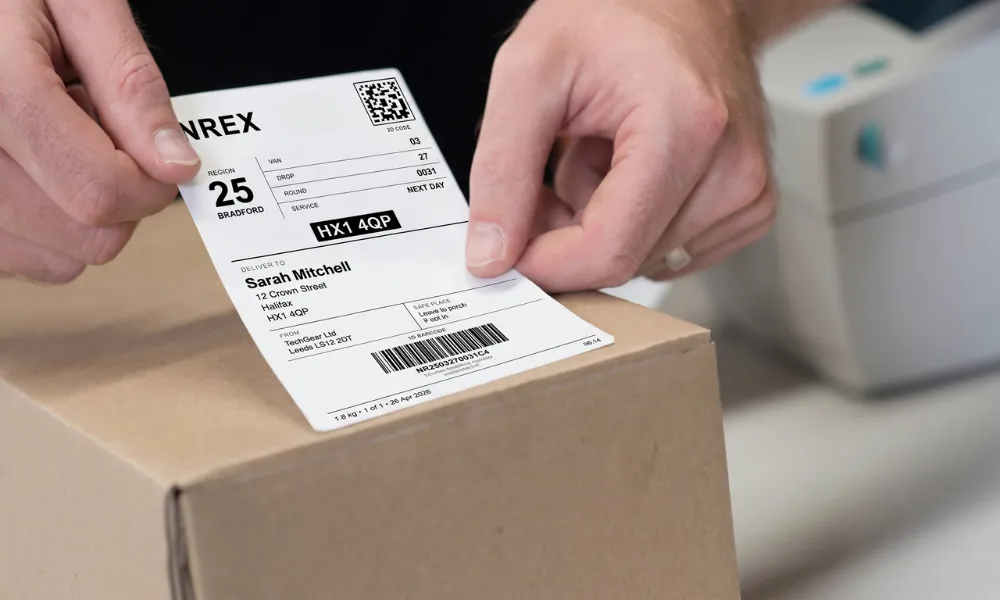
Getting a shipping label wrong wastes your time and money. A missing detail or an unreadable barcode can delay delivery or cause your parcel to be returned. Knowing how to get a shipping label the right way keeps your deliveries on track.
Most people think it is complicated. It is not. You just need the right details, the right format, and a working printer. To get a shipping label, visit your carrier's website, fill in the sender and recipient details, pay for postage, and print the label at home or through shipping software. So, do you know which method suits your business best?
What Is a Shipping Label?
A shipping label is a printed document stuck to the outside of a parcel. It tells the carrier where the package is going. It also shows where to send it back if delivery fails. No label means no delivery. Simple as that.
What Information Does a Shipping Label Contain?
Carriers need specific details to move your parcel. Missing even one field causes delays or failed delivery.
Here is what goes on a standard parcel label:
Sender name and return address
Recipient name, full address, and postcode
Tracking number and barcode
Package weight
Shipping method (standard, express, next day)
Carrier name
Payment status: Depending on the courier, the label may also include postage or payment information.
Always check the postcode first. Sorting machines read it before anything else.
Types of Shipping Labels You Should Know
Not every label works the same way. Using the wrong type causes problems at the drop-off point. Pick the right one before you print.
Standard label: Used for regular outbound parcels going from sender to recipient.
Prepaid label: Postage already paid. The customer just attaches it and drops the parcel off.
Return label: Included in the box or emailed to the customer when items come back.
Digital or QR label: No printing needed. The customer shows a QR code, and the carrier prints the label.
How to Get a Shipping Label: 3 Practical Ways
There is more than one way to get a label. The right method depends on how many orders you send each week.
1. Through Your Carrier's Website
Visit your chosen courier's website, enter the sender and recipient details, pay for postage, and print your label.
This works well for low volumes. Entering details one by one gets slow once orders pick up.
2. Through an eCommerce Platform or Free Template
Platforms like Shopify generate shipping labels directly from your orders. Free online label generators also work. You enter the details, download, and print.
Good starting point for new sellers. Templates keep the format correct for carrier scanners.
3. Through a Courier Platform or Shipping Software
Shipping software pulls your order data automatically. Labels generate in seconds without copy-pasting addresses every time.
If you send more than ten parcels a week, this saves real hours. NREX is building this kind of platform for UK sellers. Their web dashboard handles order management, shipment tracking, and label printing in one place. You can get in touch with NREX now to secure your spot before the platform goes live.
How to Get a Return Shipping Label
A simple returns process builds customer trust and encourages repeat purchases. The return shipping label is prepaid and pre-addressed. Add it to the box or send it after the purchase via email as a PDF or QR Code.
Set simple rules. Only accept returns within 30 days. Ask for a return reason. This helps you catch patterns in sizing complaints or product issues early.
When you have an automated returns portal on your site, you're eliminating the back and forth emails. The customer initiates the return process, prints the return label, and sends the parcel back.
Where to Print and Place Your Shipping Label
The normal size of labels is 4x6 inches (10x15cm). Thermal printers will reduce costs over time and are faster. A regular inkjet or laser printer also works fine.
Place the label on the largest flat side of the box. Never fold it over an edge or corner. Keep the barcode fully flat and visible. Clear tape over the label is fine, but never cover the barcode with it.
Shipping Label Best Practices
Small mistakes cause big delays. Follow these to keep your parcels moving smoothly every time.
Check the delivery address twice before printing
Use weather-resistant labels for international or long-distance parcels
Add Fragile or This Side Up stickers where the contents need care
Never reuse a label as each one holds a unique tracking number
Keep the barcode clean, flat, and fully visible at all times
Frequently Asked Questions
Are shipping labels free to create?
Creating a label on most carrier websites costs nothing at all. You still need to pay for postage before the carrier will accept and move your parcel.
Can I print a shipping label at home?
Yes, you can print one using your carrier's website or any shipping software. A regular home printer works fine. Thermal printers are better if you ship high volumes regularly.
Can I handwrite a shipping label?
You can write the delivery address by hand as long as it is neat and readable. However, the barcode must always be machine-generated by the carrier system.
Can I reuse a shipping label?
No, you cannot reuse any label ever. Each one carries a unique tracking number linked to one specific shipment. Reusing it causes serious tracking errors and lost parcels.
What size should a shipping label be?
The standard size used by most UK carriers is 4x6 inches. Almost all carrier networks and label printers are designed and set up for this exact format size.